Unknowndivide may earn a commission from purchases made through links in this post.
Ask a Fujifilm shooter why they chose the brand and the answer is often the same: the color. Fujifilm cameras come with Film Simulations, built-in looks based on the company's own photographic films, and they are a big reason so many people share straight out of camera photos with no editing at all. If you have just picked up a Fujifilm camera, or you are deciding whether to buy one, here is what Film Simulations are, what each of the main ones does and how to choose.
What Film Simulations are
Fujifilm made film for decades before it made digital cameras, and Film Simulations are its way of carrying that history forward. Each mode is a color and tone profile applied as the camera processes a photo. On the X100VI, Fujifilm offers 20 Film Simulation modes and says they harness 90 years of its color science to digitally replicate the look of classic photographic film stocks.
That is different from a filter you add later in an app. A Film Simulation shapes how the camera renders color, contrast and tone from the start, so your photos come out of the camera looking finished. If you also shoot raw files, you can still change your mind later in editing software, but many photographers find they rarely need to.
The everyday modes
PROVIA/STANDARD. Based on FUJICHROME PROVIA, a reversal film designed for professional use. Fujifilm describes it as great for all subject types, with neutral color reproduction. This is the default, and it is a safe starting point when you are unsure.
Velvia/VIVID. Based on FUJICHROME Velvia, an ultra vivid reversal film for professionals. It gives richer, higher contrast colors than PROVIA, and Fujifilm notes it is a favorite of landscape photographers. Reach for it with skies, foliage and sunsets.
ASTIA/SOFT. Based on FUJICHROME ASTIA, a reversal film designed for fashion portraits. It prioritizes soft, faithful skin tones while still showing vivid blue skies and greenery, which makes it a flattering choice for people outdoors.
REALA ACE. The newest mode, introduced as the 20th Film Simulation. Fujifilm says it combines faithful color reproduction with hard tonality, making it suitable for all subjects and situations. Think of it as a more contrasty, true to life alternative to PROVIA.
The moody modes
CLASSIC CHROME. Designed to reproduce a look similar to documentary magazines of the 20th century. Low saturation and hard tonal gradation in the shadows give it a muted, realistic feel. That makes it a natural fit for street and travel photography.
CLASSIC Neg. Based on SUPERIA, a color negative film loved by generations of photographers. It has high contrast tonal gradation and adds depth to colors by adjusting their shades in highlights and shadows while reducing saturation.
NOSTALGIC Neg. Designed to recreate the look of images in old photo albums. It produces rich colors in the shadows and a soft tonality through the midtones and highlights.
ETERNA/CINEMA. Based on ETERNA, a film designed for motion pictures. It minimizes saturation so no color overpowers another, with extremely soft tonal gradation in highlights and deep shadows that avoid clipping. It is a great choice for video and for stills with a cinematic look.
The portrait modes
PRO Neg. Hi. Based on PRO160NH, a professional color negative film. It has slightly harder tonal gradation than its sibling PRO Neg. Std, and Fujifilm says it is mainly used in portrait photography where the lighting is not easily controlled, since it provides the right amount of shadow even under flat light.
Black and white: ACROS
ACROS. Based on ACROS, a monochrome film renowned for super fine grain. Fujifilm says the mode delivers rich shadow detail and excellent sharpness while still adding grain at high sensitivity settings, recreating the textured feel of monochrome film. It is a favorite starting point for black and white photography straight out of the camera.
Grain and color effects
Film Simulations get even more interesting when you combine them with Fujifilm's analog effects.
- Grain effect. Adds natural looking grain, from subtle texture to the gritty look of high sensitivity film. You control the strength and size.
- Color Chrome Effect. Adds depth, detail and vibrancy to highly saturated red, green or yellow subjects, in three strengths, where detail might otherwise be lost.
- Color Chrome FX Blue. Boosts blue tones, which is handy for skies and water.
You can also adjust color depth, clarity, sharpness and highlight and shadow tones. Save a combination you like as a custom setting and you can return to that complete look whenever you want.
How to choose
- Not sure where to start: PROVIA/STANDARD or REALA ACE.
- Landscapes and bold color: Velvia/VIVID.
- People and portraits: ASTIA/SOFT or PRO Neg. Hi.
- Street and travel: CLASSIC CHROME or CLASSIC Neg.
- Warm, nostalgic mood: NOSTALGIC Neg.
- Video or a cinematic look: ETERNA/CINEMA.
- Black and white: ACROS, with the grain effect switched on.
The best advice is to pick one mode and shoot with it for a week. You will learn how it reacts to different light much faster than if you keep switching.
Which cameras have them
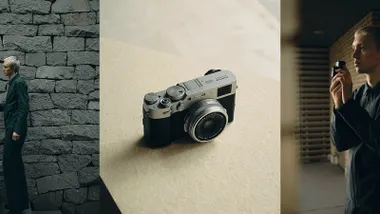
Film Simulations are built into Fujifilm's digital cameras. The Fujifilm X100VI is one of the most popular ways in, a compact with a fixed 23mm F2 lens and all 20 modes on board.
If you love the look of film itself, our list of film cameras you can still buy new and the Instax mood filter camera are fun next steps. For more compact options see our best compact cameras, or browse all our buying guides.